 Hp Laptops
 Lenovo Laptops


Product Specifications
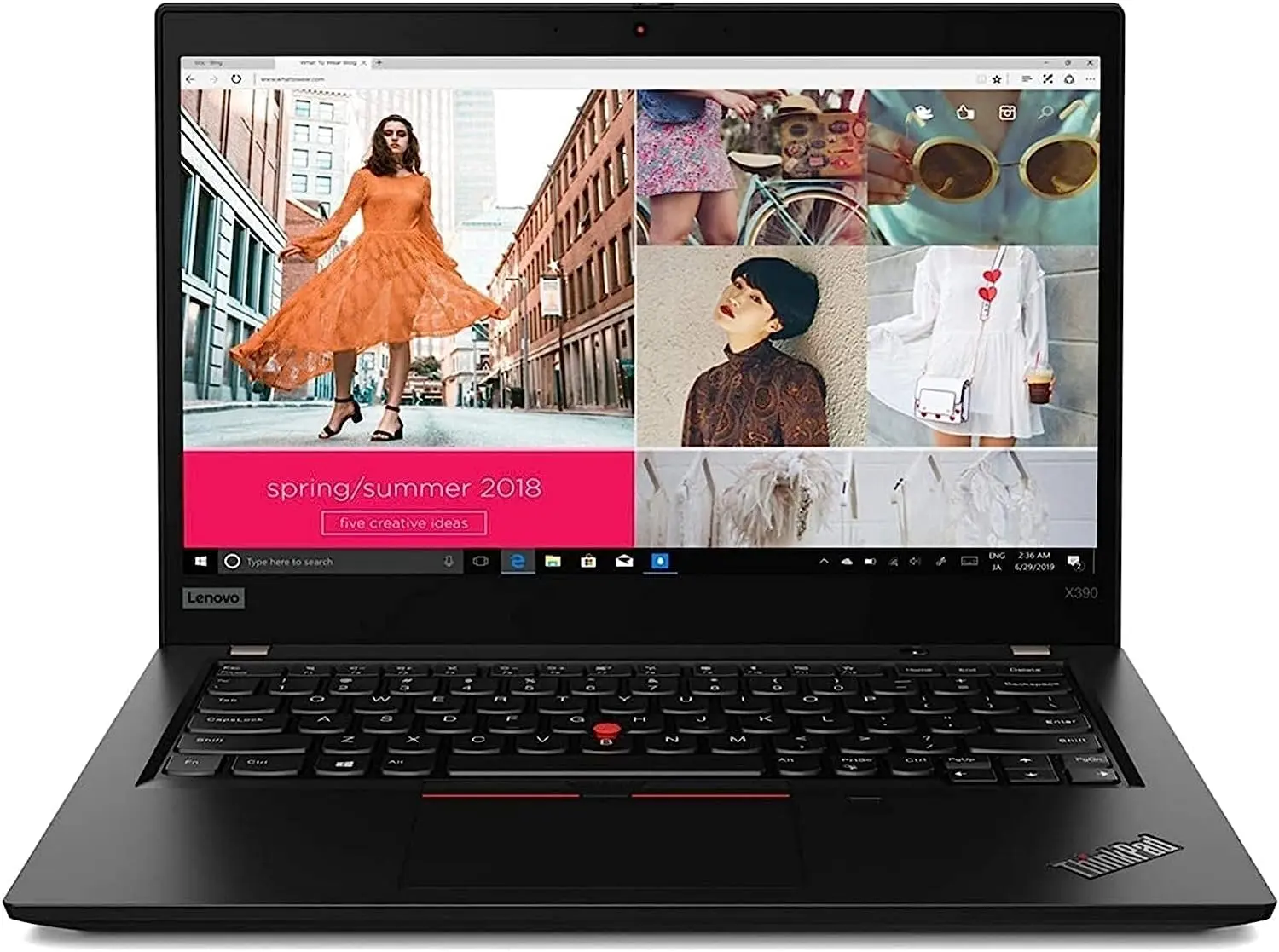
The Lenovo ThinkPad X390 Core i7 8th Gen 8GB RAM 256GB SSD Non-Touch is a compact business laptop designed for professionals, students, office users, and anyone who needs reliable performance in a portable design. It combines an 8th Gen Intel Core i7 processor, 8GB RAM, and a 256GB SSD to support everyday productivity, multitasking, browsing, research, and office applications.
Its compact ThinkPad design makes it convenient for users who work on the move, while the 13.3-inch non-touch display provides a traditional laptop experience. The comfortable ThinkPad keyboard and business-oriented construction make it suitable for document creation, programming, online learning, email, presentations, and general professional use.
Lenovo ThinkPad X390 Core i7 8th Gen 8GB RAM 256GB SSD Non-Touch Price in Kenya
| Product | Price |
|---|---|
| Lenovo ThinkPad X390 Core i7 8th Gen 8GB RAM 256GB SSD Non-Touch | KSh 28,000 |
Lenovo ThinkPad X390 Core i7 8th Gen 8GB RAM 256GB SSD Non-Touch Key Specifications
| Specification | Details |
| Processor | Intel Core i7 8th Gen |
| RAM | 8GB |
| Storage | 256GB SSD |
| Display | 13.3-inch Non-Touch |
| Graphics | Intel Integrated Graphics |
| Connectivity | Wi-Fi, Bluetooth |
| Ports | USB, USB-C |
| Keyboard | ThinkPad Keyboard |
| Form Factor | Compact Business Laptop |
| Operating System | Windows |
Lenovo ThinkPad X390 Core i7 8th Gen 8GB RAM 256GB SSD Non-Touch Design & Build
- Compact ThinkPad design for easy portability.
- 13.3-inch display offers a practical balance between screen space and mobility.
- Business-oriented construction for everyday professional use.
- Comfortable ThinkPad keyboard supports extended typing sessions.
- Precision touchpad provides convenient navigation.
- Suitable for carrying to the office, school, meetings, and remote work locations.
Lenovo ThinkPad X390 Core i7 8th Gen 8GB RAM 256GB SSD Non-Touch Performance
- 8th Gen Intel Core i7 processor supports everyday productivity and professional workloads.
- 8GB RAM handles common multitasking requirements.
- 256GB SSD provides fast system startup and application loading.
- Integrated Intel graphics support office applications and multimedia.
- Suitable for browsing, research, document creation, and presentations.
- Supports programming and general software development tasks.
Lenovo ThinkPad X390 Core i7 8th Gen 8GB RAM 256GB SSD Non-Touch Connectivity and Compatibility
- USB ports support compatible peripherals and external storage.
- USB-C connectivity supports compatible accessories and data transfer.
- Wi-Fi enables wireless internet connectivity.
- Bluetooth supports compatible wireless peripherals.
- Compatible external displays can be connected through supported video interfaces.
- Suitable for common Windows productivity, business, and educational applications.
Lenovo ThinkPad X390 Core i7 8th Gen 8GB RAM 256GB SSD Non-Touch Ideal Use Cases
- Office and administrative work.
- Web browsing and email.
- Programming and software development.
- Online learning and research.
- Document creation and presentations.
- Remote work and mobile productivity.
- Business and professional applications.
Lenovo ThinkPad X390 Core i7 8th Gen 8GB RAM 256GB SSD Non-Touch Pros and Cons
| Pros | Cons |
| 8th Gen Core i7 processor | 8GB RAM may limit heavier multitasking |
| Fast 256GB SSD | Non-touch display |
| Compact and portable design | 256GB storage may be limited for large files |
| Durable ThinkPad construction | Older hardware platform |
| Comfortable ThinkPad keyboard | Integrated graphics not suitable for demanding gaming |
| Suitable for business and productivity | — |
FAQs
1. How Much Is the Lenovo ThinkPad X390 Core i7 in Kenya?
The listed price for the Lenovo ThinkPad X390 Core i7 8th Gen 8GB RAM 256GB SSD Non-Touch is KSh 28,000.
2. How Much RAM Does the Lenovo ThinkPad X390 Have?
This configuration comes with 8GB RAM, suitable for office applications, browsing, online learning, and everyday multitasking.
3. Does the Lenovo ThinkPad X390 Have an SSD?
Yes. It features a 256GB SSD, providing fast startup, responsive application loading, and quick access to files.
4. What Processor Does the Lenovo ThinkPad X390 Use?
The specified model uses an 8th Gen Intel Core i7 processor, suitable for everyday productivity and professional computing tasks.
5. Does the Lenovo ThinkPad X390 Have a Touchscreen?
No. This configuration is specified as non-touch, providing a traditional laptop display experience.
6. Is the Lenovo ThinkPad X390 Good for Programming?
Yes. The combination of an 8th Gen Intel Core i7 processor, 8GB RAM, and 256GB SSD makes it suitable for programming, web development, development environments, and general software work.
7. Is the Lenovo ThinkPad X390 Core i7 8th Gen Worth Buying?
At KSh 28,000, it is a practical option for users looking for a compact business laptop with a Core i7 processor and SSD storage. It is particularly suitable for office work, education, browsing, programming, research, and remote productivity.
Conclusion
The Lenovo ThinkPad X390 Core i7 8th Gen 8GB RAM 256GB SSD Non-Touch combines a compact and portable business design with capable everyday performance. Its 8th Gen Core i7 processor, 8GB RAM, and 256GB SSD make it suitable for office work, programming, online learning, research, browsing, and everyday multitasking. At KSh 28,000, it offers a practical option for users who need an affordable ThinkPad for productivity and mobile computing.