 Hp Laptops
 Lenovo Laptops

Product Specifications
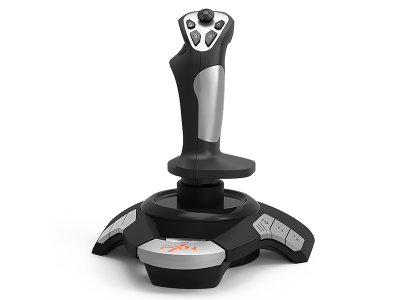
The PXN F16 Flight Stick is a budget-friendly USB wired joystick designed for PC flight simulation gamers who want a more realistic flying experience. It is commonly used in games such as Microsoft Flight Simulator, War Thunder, X-Plane, and other aviation simulation titles.
This flight stick is ideal for beginners and casual gamers who want to move beyond keyboard and mouse controls. In Kenya, it is popular because of its affordable price and simple plug-and-play setup.
PXN F16 Flight Stick Price in Kenya
| Product | Price |
|---|---|
| PXN F16 Flight Stick | KES 4600 |
PXN F16 Flight Stick Specifications
| Feature | Details |
|---|---|
| Brand | PXN |
| Model | F16 |
| Connection Type | USB Wired |
| Compatible Platform | PC (Windows XP/7/8/10/11) |
| Button Layout | 12 programmable buttons |
| Control Type | 4-axis control system |
| Throttle | Built-in manual throttle |
| Hat Switch | 8-way directional switch |
| Vibration | Yes (depending on version/settings) |
| Weight | Approx. 517g |
PXN F16 Flight Stick Design and Build
The PXN F16 Flight Stick features an ergonomic grip designed to fit comfortably in the hand during long gaming sessions. Its compact structure includes a stable base that helps reduce movement during intense flight simulation gameplay.
The build is lightweight yet functional, making it suitable for desk setups with limited space. The button layout is positioned for quick access during gameplay, improving control efficiency.
PXN F16 Flight Stick Connectivity
USB Connection
- Uses wired USB connection for stable input
- Provides plug-and-play setup on Windows PCs
- Does not require complex installation in most cases
- Ensures low input delay for simulation games
System Connectivity
- Connects directly to PC flight simulation software
- Supports Windows-based gaming systems
- Works with most modern flight simulation titles
- Recognized as a standard USB gaming controller
PXN F16 Flight Stick Compatibility
Game Compatibility
- Compatible with Microsoft Flight Simulator
- Works with War Thunder
- Supports X-Plane series
- Works with DCS World and similar simulators
Device Compatibility
- Supports Windows 7, 8, 10, and 11 systems
- Works with gaming laptops and desktop PCs
- Compatible with USB 2.0 and above ports
- Not officially supported on macOS or consoles
PXN F16 Flight Stick Features and Performance
Flight Control Performance
- Provides 4-axis control for realistic movement
- Includes built-in throttle for speed adjustment
- Supports precise directional control for simulation
- Enhances immersion compared to keyboard controls
Button Functionality
- Includes 12 programmable buttons
- Allows customization for different flight controls
- Supports rapid access to in-game functions
- Improves control efficiency during gameplay
Stability and Handling
- Weighted base improves stability during use
- Ergonomic grip reduces hand fatigue
- Smooth joystick movement for better control
- Designed for casual and beginner simulation users
PXN F16 Flight Stick Ideal Use Cases
Flight Simulation Gaming
- Ideal for Microsoft Flight Simulator beginners
- Works well for casual aviation gameplay
- Enhances realism in simulation environments
Combat Flight Games
- Suitable for War Thunder aerial battles
- Supports arcade-style flight combat games
- Improves aiming and maneuvering control
Learning and Training
- Helps new users learn flight simulation basics
- Provides introduction to joystick-based control systems
- Useful for casual aviation enthusiasts
Home Gaming Setup
- Fits small desk gaming setups
- Easy plug-and-play installation
- Suitable for budget gaming environments
PXN F16 Flight Stick Pros and Cons
| Pros | Cons |
|---|---|
| Affordable entry-level flight stick | Not suitable for professional simulation setups |
| USB plug-and-play connection | Limited advanced features |
| Built-in throttle control | No official Mac or console support |
| 12 programmable buttons | Build quality is basic |
| Ergonomic grip design | No force feedback system |
| Good for beginners | Limited precision compared to premium HOTAS systems |
Frequently Asked Questions (FAQs)
1. What is the price of PXN F16 Flight Stick in Kenya?
It costs approximately KES 4600 depending on the seller.
2. Is it compatible with Windows 11?
Yes, it works with Windows 7, 8, 10, and 11.
3. Does it support Microsoft Flight Simulator?
Yes, it is compatible with Microsoft Flight Simulator.
4. Is it plug and play?
Yes, it uses USB plug-and-play functionality on most PCs.
5. Does it work on consoles?
No, it is designed for PC use only.
6. Does it have vibration feedback?
Some versions may support basic vibration, but it is limited.
7. Is it good for beginners?
Yes, it is designed for entry-level flight simulation users.
8. Does it include a throttle?
Yes, it has a built-in manual throttle control.
Conclusion
The PXN F16 Flight Stick is a practical and affordable flight simulation controller for PC gamers in Kenya. It offers USB plug-and-play connectivity, programmable buttons, a built-in throttle, and an ergonomic design that improves the flight gaming experience.
At a price of KES 4600 in Kenya, it is a solid entry-level option for beginners who want to experience realistic flight simulation without investing in expensive professional equipment.